
- User Guide
Tips to Set Up Your First Workflow
Mode 1: Create Approval Workflow Only
1.1. Add Static & Dynamic Recipients
1.3. Set Conditions for the Recipient
1.7. Add & Use Recipient Group
Mode 2 & 3: Generate & Send PDF/document only
2.1. How to generate a PDF/document
2.2. Common file template errors
2.3. Send PDF/documents to recipients
2.4. Send PDF/documents to respondents
3.1. Combine Modes – Setup File Template
3.2. Combine Modes – Add recipients
Email Settings & Features:
4.1. Change Final Email Settings to Save Quota
4.3. Show or Hide the Sheets Report in the Final Email
4.4. Show File Attachment With Recipients
4.6. Customize Email Templates
4.8. Set Conditions for Custom Email Template
4.9. Add CC and BCC Email Addresses
Team Plan:
5.2. Share Edit Permission With Team Member
Additional Features:
6.1. Set Reminders for Approval Emails
6.2. Resend All Pending Requests
6.3. Dashboard or Form Management Page
6.5. Approval Link Authentication
6.6. Transfer All Forms to Another User
6.7. Transfer Paid Plan to Another User
6.8. Avoid Automatic Approval/Rejection
6.9. Signature on Generated PDF/Google Docs in Combined Mode
6.10. Approval Status Tracking Link for Respondent
6.11. Cancel a Request via Email
6.13. Change Approval Decision for Recipients
6.15. Approve via Dashboard for Recipients
6.16. Form Owner Approves on Behalf of Recipients
6.17. Bulk Actions: Approve, Reject, and Cancel
6.18. Set Conditions for Destination Folders
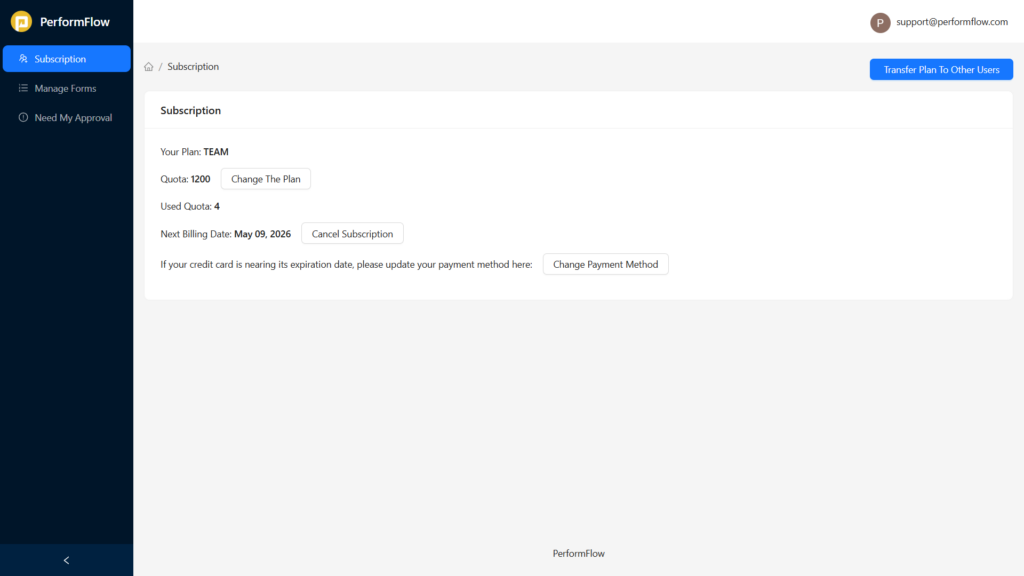
This article explains how to cancel your subscription and change your payment method in PerformFlow.
Cancel Subscription
You can cancel your PerformFlow subscription anytime directly from your Subscription page.
To cancel your subscription:
Go to the Dashboard at https://apps.performflow.com/subscription
Under the Subscription section, find Cancel Subscription next to your next billing date
Click Cancel Subscription and follow the on-screen instructions to confirm
After cancellation, your subscription will remain active until the end of the current billing cycle.
Change Payment Method
If your credit card is expiring soon or you need to update your billing details, you can change your payment method at any time.
To change your payment method:
Go to Subscription in PerformFlow.
Under the payment information section, click Change Payment Method.
Enter your new billing details and submit.
Your updated payment method will be used for future billing cycles.